PPT Master from 1.0.0 to 5.0.0: Designing Content Production with Agents
PPT Master offers a concrete case of how agentic content production inherits experience, selects capabilities, preserves decisions, and allocates authority among people, agents, and tools.
Anyone following AI-generated presentations has probably come across PPT Master.
With nearly 50,000 GitHub stars, this open-source project is among the most closely watched AI presentation tools. People use it because it can help produce editable PowerPoint files with AI in a controllable, reliable way.
PPT Master appeared in December 2025. Eight months later, it had moved from v1.0.0 to v5.0.0. How did its design change across those major releases? What might that trajectory teach us about producing content with AI today?
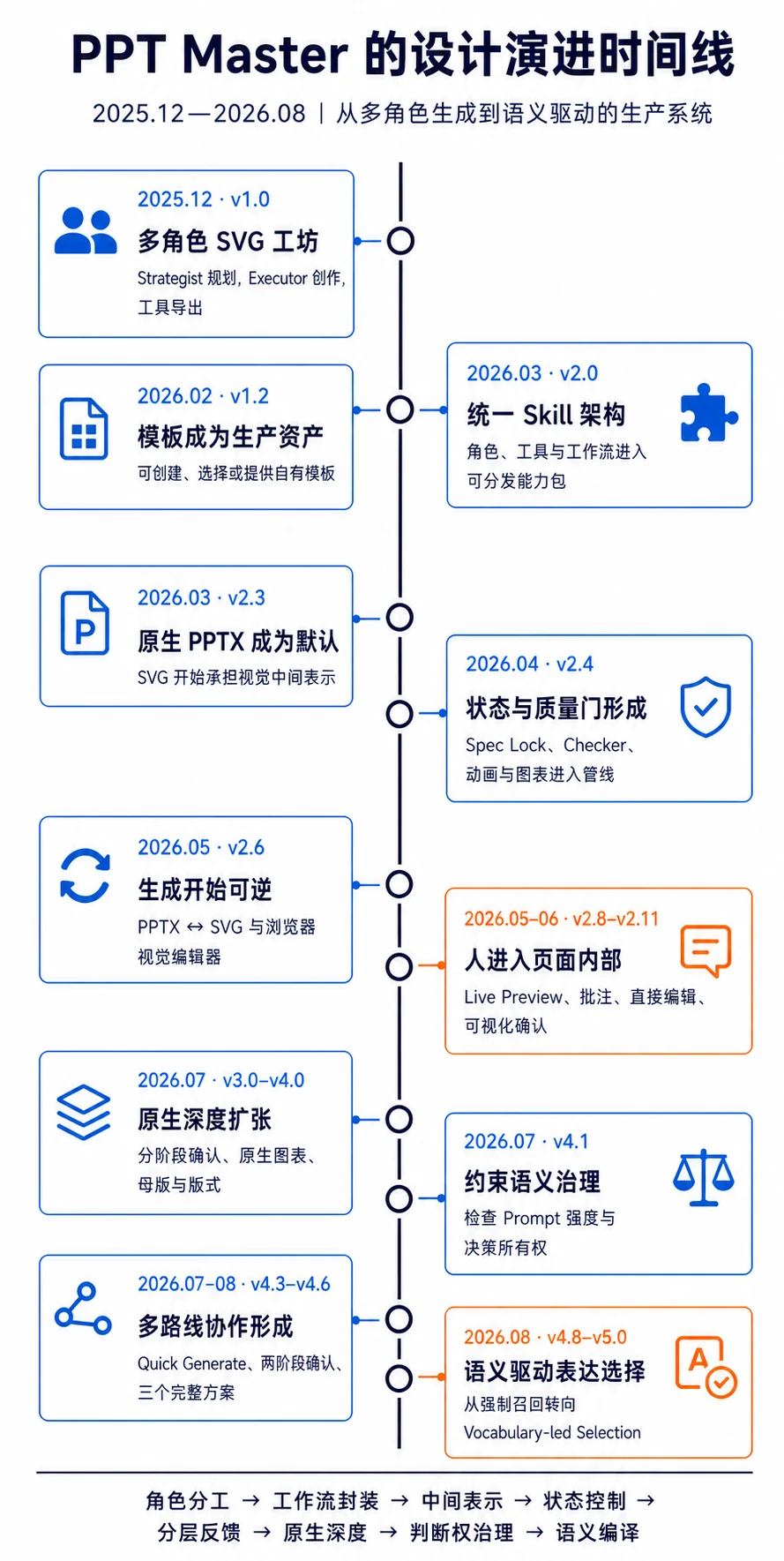
The evolution of PPT Master
The first set of changes packaged capabilities for reuse.
In v1.0, PPT Master built presentations through a multi-agent system. A Strategist, Executor, and Optimizer handled planning, slide creation, and refinement respectively.
Version 1.2, released in February 2026, made templates independent production assets for the first time. A new Template Designer could create reusable slide templates. Users could choose built-in templates or supply their own SVG slides and design specifications.
By March 2026, Skills were becoming a common way to organize specialized capabilities in agent applications. Version 2.0 moved the former roles, tools, and workflows into a unified Skill, leaving only lightweight entry points for external tools.
Roles, tools, and design experience had become capabilities that could be loaded and used again.
The second set of changes made production stateful and editable.
Skills addressed how to organize capabilities. But a presentation also had to remain editable in PowerPoint, which called for different paths for the agent’s visual creation and the final file delivery.
Version 2.3, released that same month, separated the two layers: the agent created visuals in SVG, and deterministic tools converted them into native PowerPoint DrawingML objects. The agent retained design freedom while users received text and shapes they could edit.
That version also recorded complete design decisions and their reasons in a Design Spec and introduced a Create Template workflow.
Version 2.4, released in April 2026, added a Spec Lock on top of the Design Spec. It extracted what needed to remain consistent across slides into a machine-readable execution contract that the Executor could consult repeatedly. A checker began testing whether slides had drifted from confirmed decisions. Create Template also gained the ability to import an existing PPTX.
The conversation was no longer the system’s only memory. A person’s approval could be carried from slide to slide in a form that could be checked.
Version 2.6, in May 2026, introduced reverse conversion from PPTX to SVG. The delivered file could re-enter the agent’s visual workspace. A one-way “generate and export” process became a cycle of revision.
The third set of changes let the system choose a route and close the feedback loop.
Version 2.8 put Live Preview and object-level comments into the main flow; v2.9 added direct editing. Semantic problems returned to the agent, while geometric problems could be fixed directly in SVG. Feedback no longer meant rebuilding the entire presentation.
Version 2.8 also split templates into Brand, Layout, and Deck, separating brand identity, page structure, and presentation type. Version 4.0 then compiled Layout and Deck into PowerPoint’s native Masters, Layouts, and Placeholders: templates became part of the file structure, not just visual references.
By v4.1, the team was examining whether compressing prompts weakened constraints or shifted decision-making authority. Version 4.3 introduced Quick Generate, which bypassed full strategy and approval while keeping material preparation, quality checks, and native export. Different tasks could follow different routes.
Version 4.4 added Style and moved template selection to Stage 1, before generation. Users could combine Brand, Style, Layout, and Deck or provide a template workspace of their own. Formal export also required a passing report for the current version. By v4.6, people compared three complete design directions. Version 5.0 turned failures that fallback paths had concealed into explicit errors.
Together, these changes altered the nature of the product. PPT Master grew from an experimental relay of agents into a presentation production tool that many people could actually use.
How agentic content production organizes decisions
Making a presentation involves many judgments: what to say, how to structure it, which visual direction and materials to use, what may change, and what counts as ready to deliver.
In an early system, many judgments about the current task live mainly in the conversation. As the process grows, they may be forgotten, overwritten, or misunderstood. A local edit may also disturb something that was already approved.
PPT Master’s later Skills, templates, Design Spec, reversible SVG intermediate layer, quality reports, and human approval address different questions. How is previous experience inherited by the next task? How is the right capability chosen? How does a decision persist? Where does a revision begin? Which decisions still belong to a person?
Beyond presentations, these changes point to four general mechanisms for agentic content production.
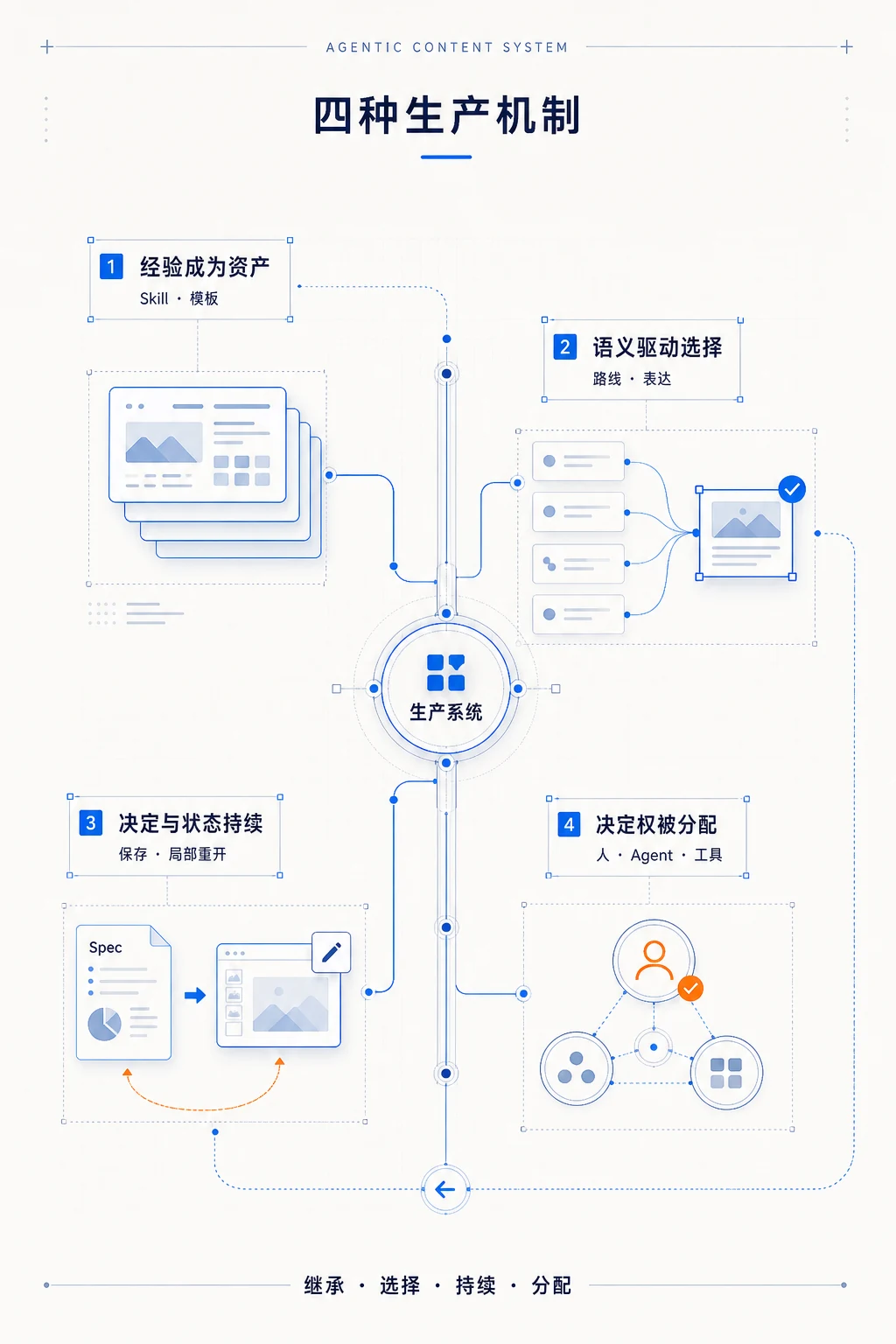
1. Turn human experience into assets the system can inherit
PPT Master initially organized production around the Strategist, Executor, and Optimizer. Their role prompts stored planning methods, design experience, and instructions for using tools.
The unified Skill organized that experience into specialized capabilities an agent could load again: how to interpret a task, what sequence to follow, when to use tools, and how to check a result. Roles could change while the method continued into later tasks.
Templates preserved a different kind of experience. Brand fixed identity, Style offered a visual direction, Layout specified slide structure, and Deck preserved the organization of an entire presentation. Supplying a custom template similarly gave the system requirements and prior judgments before generation began.
Skills preserve a way of working; templates preserve repeatedly confirmed forms of expression in a particular setting. Both take human experience out of the present conversation and turn it into a reusable production asset.
The language rules and recurring sections of a publication, the shot grammar and caption conventions of a video, or the components and layouts of a design system play similar roles. Human judgment can precede the current task and continue to shape later work.
2. More capabilities demand better selection by meaning
As charts, templates, layouts, images, and animations accumulate, the range of capabilities an agent can call grows. So does the difficulty of choosing. A system may force a structure onto a slide simply because it exists in the catalog, or fall back to a familiar format when a keyword does not match.
Later versions of PPT Master separated discovering capabilities from selecting them. The catalog told the agent which forms were available; the relationship a slide needed to express determined which form to use. By v5.0, the agent first interpreted the relationships in a slide, then selected a suitable structure and visual vehicle.
Choice operated at two scales. At the task level, a full strategy, Quick Generate, template creation, editing an existing file, and format conversion each addressed different inputs and constraints. At the slide level, the content relationship guided how structure, charts, images, and animations entered the expression.
The toolkit determines what the system can call. The selection mechanism determines whether a capability appears in the right place.
3. Save decisions, but allow local decisions to reopen
Content production usually takes several rounds of generation and revision. If decisions exist only in chat, later steps depend on the model remembering them. As the number of slides grows and the context changes, approved colors, structures, and directions can drift.
The Design Spec wrote complete design decisions into a separate artifact. The Spec Lock converted the stable, cross-slide parts into execution constraints. Together, they preserved decision state: what had been settled in conversation could be read downstream and tested by checking tools.
The Design Spec and Spec Lock preserved decisions; SVG preserved the actual slides resulting from those decisions. The agent could create and revise them there; tools could measure, check, and convert them; users could act on the same intermediate result through Live Preview, object comments, and direct editing. Reverse PPTX-to-SVG conversion brought delivered files back into production.
Editability had two layers. First, text, shapes, and images had to remain editable in PowerPoint. Second, the system had to keep approved decisions intact while reopening only the parts affected by feedback.
Semantic questions returned to the agent. Position and size could be fixed directly on objects. Conversion problems returned to the relevant tool. A failed quality check went back to the step that produced the problem. A local change now had a clear destination.
For content that will be revised, editability determines whether a generated result can enter further production. The first version becomes a place to continue working.
4. Human–AI collaboration is an allocation of decision rights
For every consequential choice in a collaborative production system, we need to distinguish at least four roles: who proposes it, who executes it, who verifies it, and who has final authority.
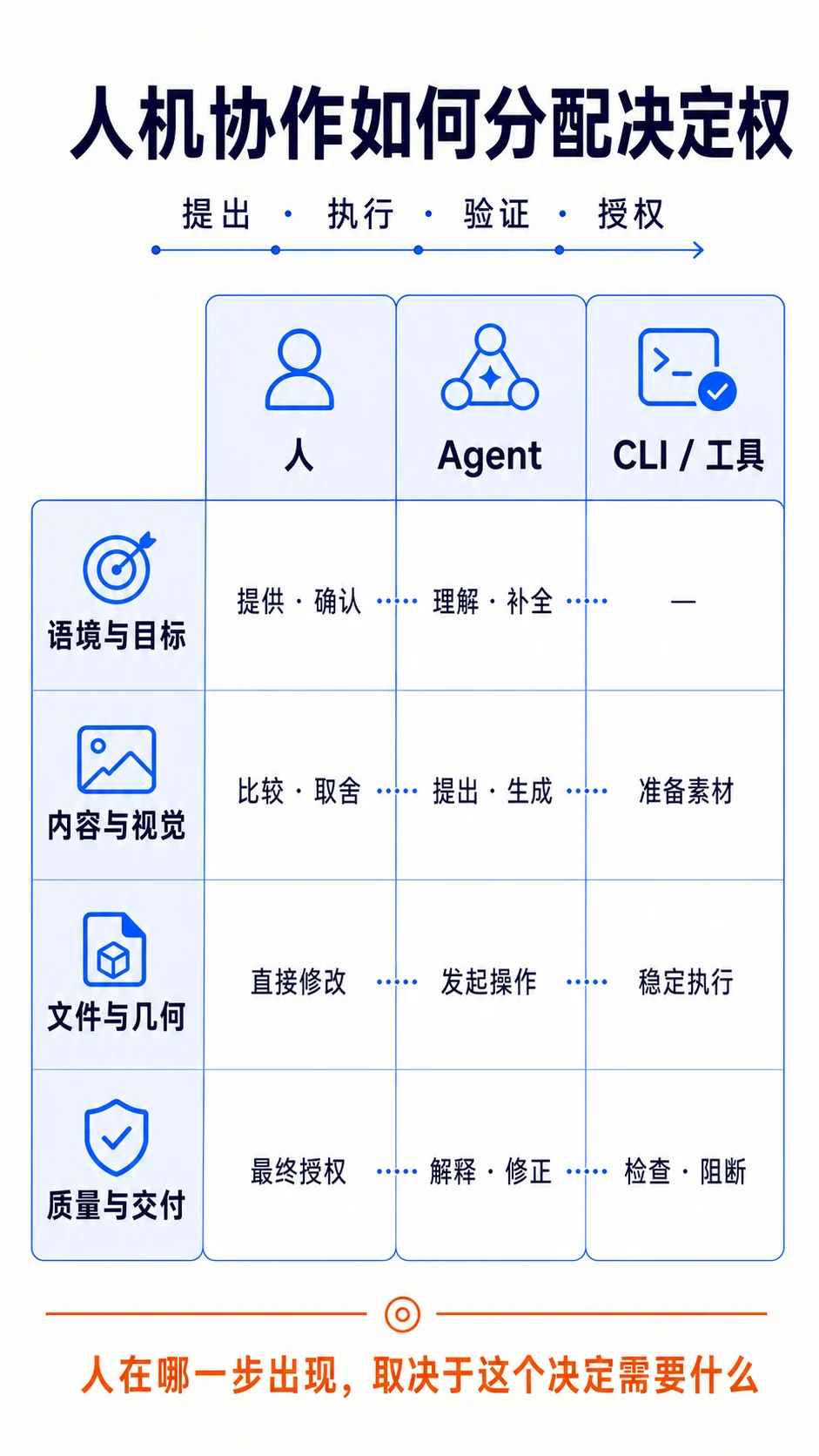
Agents are well suited to organizing materials, developing an argument, proposing structures, and forming visual directions. These tasks require context and allow multiple valid answers. CLIs and deterministic tools handle file conversion, measurements, structural checks, and repetitive operations, where the same input should lead to a stable result. People contribute context and preferences the system does not have, compare complete directions, handle exceptions and tradeoffs, and make decisions where responsibility rests with them.
One agent may plan and create, and one CLI may coordinate several tools. Yet the producer, checker, and authorizer still carry different responsibilities.
PPT Master’s prompt regression in v4.1 showed that authority also lives in prompts, schemas, and constraints. Compressing “you may refer to this” into “you must follow this” turns a reference into a lock and takes a local judgment away from the Executor. The code may run without an error even as the production rules have changed.
Human in the loop describes a person’s control over a particular decision. A person may provide templates and context before generation, compare proposals and annotate or directly edit slides during production, or leave earlier steps to the agent while retaining final publication authority. Intervention is meaningful only when the person can see the relevant state and has the power to change the result or the route ahead.
Quick Generate reduced planning and approval while keeping material preparation, quality checks, and native export. The appropriate degree of human involvement depends on uncertainty, revision cost, and responsibility in the task. Human in the loop can therefore be made concrete for each decision: when does a person appear, what can they see, and what can they change?
PPT Master’s evolution gradually made the judgments hidden inside a presentation visible. Some became reusable assets, some were left for agents to choose, some were carried out reliably by tools, and some still required a human decision.
We can understand collaboration with AI at this scale of decisions: how content takes shape depends on which judgments are inherited, which choices can be reopened, what people are willing to hand to the system, and which decisions they continue to own.
Translation: Codex prepared this English version from Biaoo’s published Chinese article. Biaoo researched and developed the original analysis.