From Prompt to Skill to App: Teachers Are Becoming Educational Software Developers in the AI Era
Teachers are turning classroom experience into reusable digital tools. What changes when they can help design the software they teach with, and what support will they need?

In this essay
- 1. What is new in this report on AI training for teachers?
- 2. From Prompt to Skill to App: what actually changes?
- 3. Software needs scale; teaching needs context
- 4. A deeper change: teachers gain more say in technology design
- 5. Future education products may offer more than a finished tool
- 6. Enabling teachers to create tools does not make them responsible for all development
On October 15, OpenAI updated its reporting on AI Skills Jam, a program for US K–12 educators, with a report titled From Curiosity to Classroom Outcomes. The program consists of hands-on AI workshops for teachers and education administrators. More than 1,600 educators took part. Alongside learning to use ChatGPT, they created lesson plans, teaching materials, and workflows, and even built websites and small applications. [1][2]
One set of figures stands out: of 802 participant responses, 741—about 92%—reported leaving with a tool or workflow they could use again. Among those 741 respondents, 18% created Skills, Projects, or Apps, and 10% built websites. These are participants’ self-reports, and Skills, Projects, and Apps were grouped into a single category. The figures cannot tell us how many teachers actually developed software. [1]
But several cases in the report drew my attention to a change worth following: teachers are beginning to turn their working methods, teaching experience, and particular needs into reusable digital tools.
1. What is new in this report on AI training for teachers?
AI Skills Jam was organized by OpenAI Academy in partnership with the Walton Family Foundation and took place in nine US regions during the summer and fall of 2026. [1] The workshops were practical: participants learned to use AI with guidance from mentors and tried to solve real problems in their teaching or administrative work.
The report describes several teachers’ projects. Karl Craddock, a chemistry and physics teacher in Illinois, used ChatGPT to simulate experiments and create three-dimensional models of abstract concepts such as magnetic fields. Traditionally, lessons on magnetic fields often rely on two-dimensional illustrations, board drawings, or laboratory equipment to help students understand. He can now quickly turn an idea for a learning activity into a model that can be displayed and manipulated. Craddock described being able to turn some ideas that occurred to him while driving into tools ready to use before class began. [1]
Adam Hellewell, a drama teacher in Utah, started with a different set of needs. Putting on a school production involves much more than guiding rehearsals: someone must schedule auditions, break down scripts, track props and costumes, plan rehearsals, and communicate with families.
During the training, Hellewell began using ChatGPT to build a series of reusable tools. Some organize auditions; others turn scripts into production checklists; still others explore how rehearsal schedules and current progress can help identify the work that needs doing next. These tools are still being developed and explored, rather than being mature, released software. But the needs they address are very specific. [1]
For a commercial software company, developing a tool tailored to one drama teacher’s working habits might offer too little financial return. The teacher who identifies the need now has a chance to try building it with AI.
The report also features Ashtin Johnson, a fifth-grade teacher who used AI to rebuild Canvas courses and design five differently themed course templates, including consistent buttons, course modules, and family-facing information pages. Another education administrator, Cesar Lopez, created an AI “chief of staff” to check unread emails near the end of each workday and flag messages that needed a reply. [1]
These cases involve different technical forms. Some are teaching materials and templates; some are reusable workflows; others are approaching functioning small applications. What they share is that the needs come from educators’ own work, and those educators are beginning to participate directly in creating the tools.
AI teaching assistants have largely focused on making lesson preparation, question writing, marking, and communication more efficient. In these cases, teachers are beginning to do something else: they are using AI to create the functionality they need, as well as using the functionality AI already provides. That may be the more consequential change.
2. From Prompt to Skill to App: what actually changes?
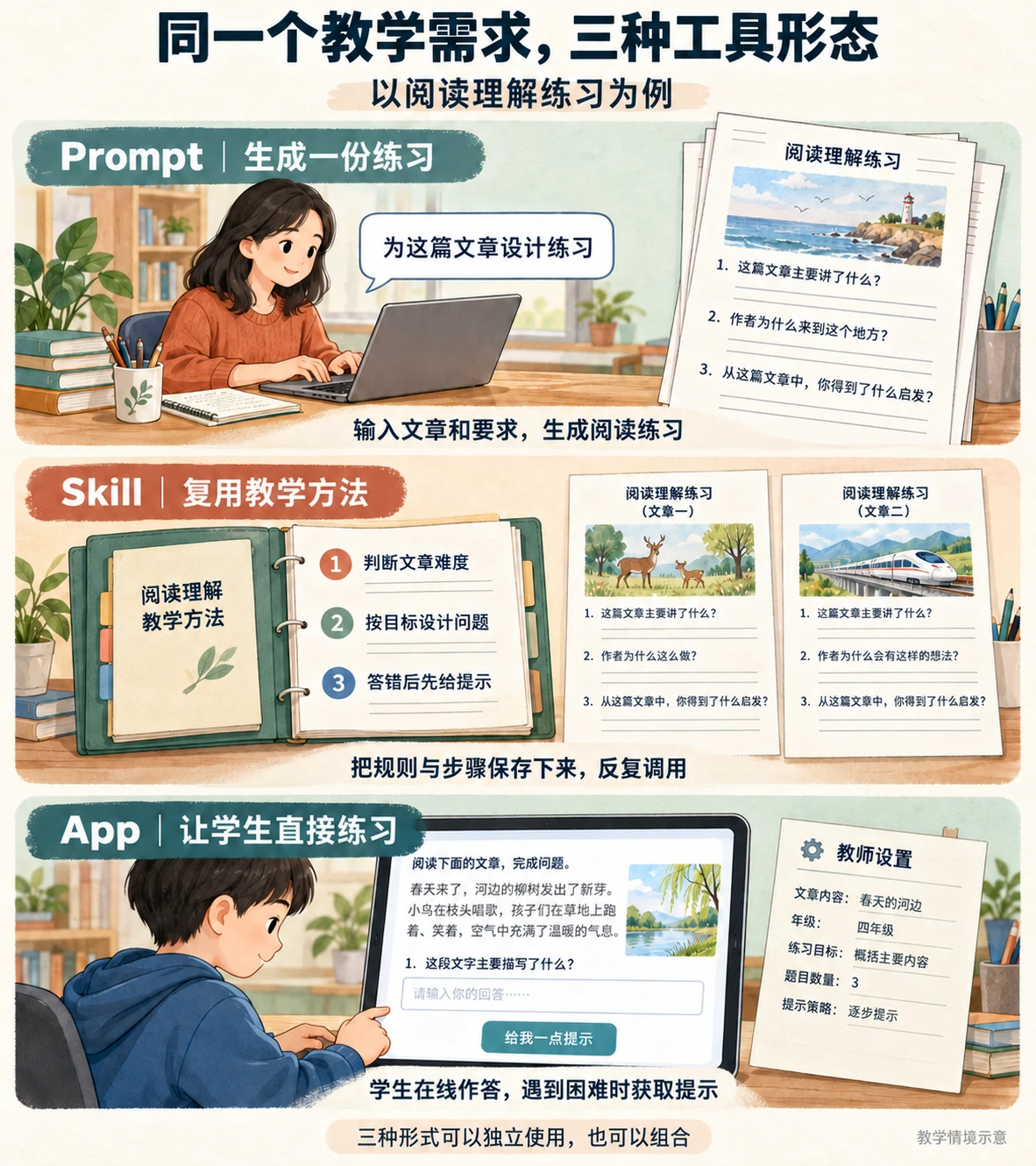
A prompt generates a set of exercises; a skill stores teaching rules and steps for reuse; an app lets students answer questions and request hints. The three forms can be used independently or combined.
Over the past few years, the most common way for teachers to use AI has been through prompts. A language teacher might write: “Based on this text, design ten reading-comprehension questions for fifth-grade students.” AI can quickly produce a set of questions. This is useful: teachers can spend less time preparing routine materials and more time on instructional design and feedback.
Looking more closely at teachers’ work, however, reveals that many tasks rest on a relatively stable method. An experienced teacher designing reading-comprehension exercises might first assess the text’s difficulty, then identify learning objectives and arrange different types of questions. For students who need more support, the emphasis might be on finding information and understanding the text. For more advanced students, the teacher might add inference, analysis, and open-ended questions. When a student answers incorrectly, the teacher may prefer to guide them back to the text to find relevant information and reconsider their interpretation, rather than immediately supplying the answer. These decisions draw on years of teaching experience.
If the teacher describes this method to AI in a new prompt each time, similar instructions must be repeated. But the teacher can also try organizing the method into reusable rules, steps, and criteria that AI can follow across different texts and students. This begins to resemble a Skill or Workflow.
Here, “Skill” does not refer to a particular company’s product. I use the term broadly for a capability that packages task rules, professional experience, and procedural steps so that AI can invoke them repeatedly. The teacher can continue using the method in later tasks.
Now suppose the teacher wants students to complete exercises directly on an interactive page, with different hints depending on their answers, a record of their learning process, and the ability for the teacher to change questions and feedback rules. The teaching method could then be organized into a small app.
Prompt, Skill, and App are not necessarily successive levels of technical maturity. Prompts can be reused; skills do not always need their own interfaces; apps can call multiple skills. Different forms suit different problems, and greater complexity does not automatically mean greater value.
Still, these three forms reveal a significant shift: prompts primarily help teachers complete particular tasks; skills make their experience and methods reusable; apps can turn those methods into interactive learning experiences that continue to operate over time.
In a one-off prompt, the teacher mainly tells AI what to do. When a teaching method becomes a skill or app, the teacher can also decide how the tool should work pedagogically, how it should respond to students, and how it should determine whether a task is complete.
Teaching expertise has traditionally lived in teachers’ actions, lesson plans, resources, and exchanges with colleagues. Some of it can now become a digital capability that can be executed, reused, and modified. Teachers’ expertise has a chance to become part of the tool itself. That could matter more in the long run than simply generating more teaching content.
3. Software needs scale; teaching needs context
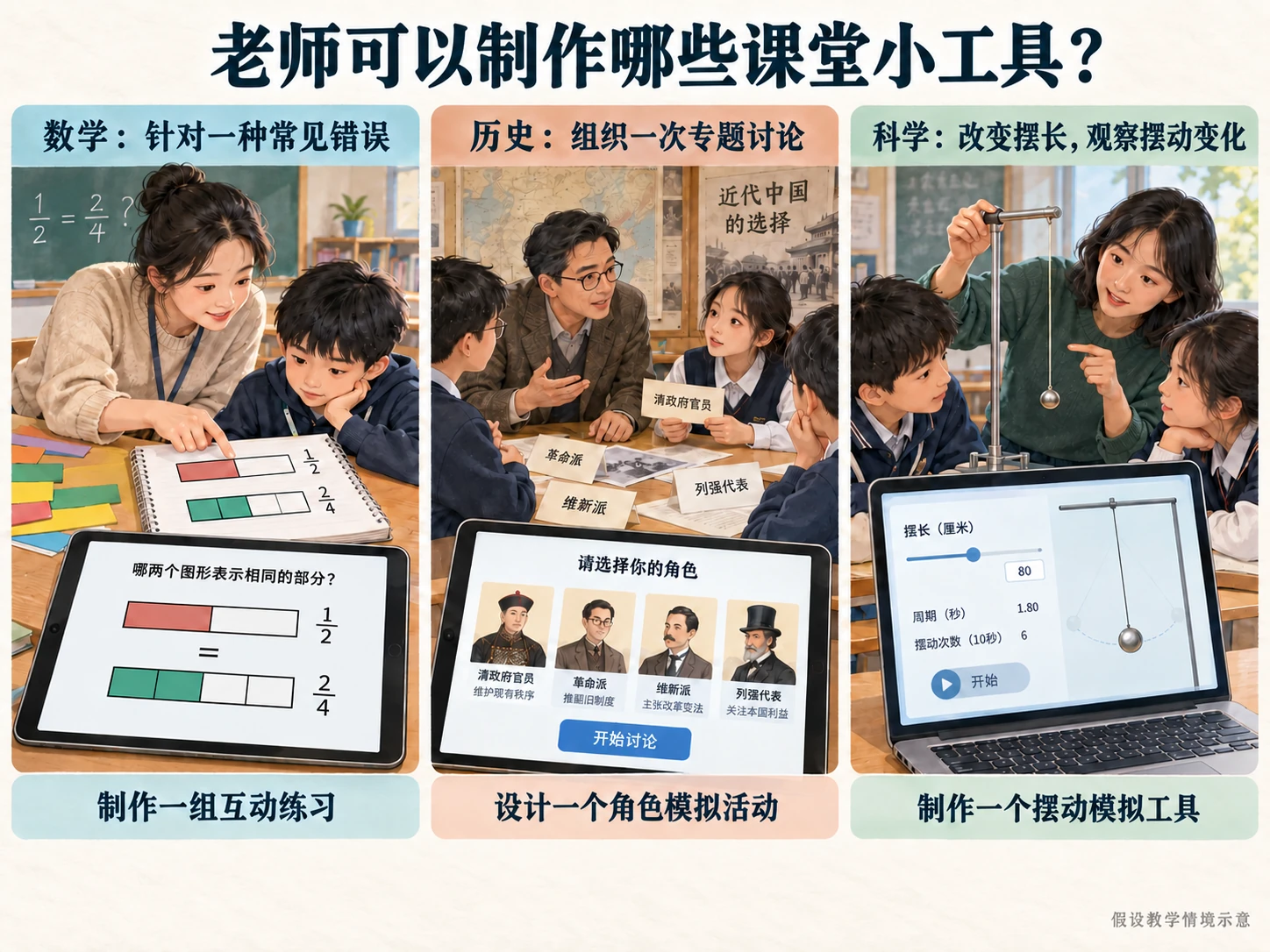
Three possible classroom tools: practice for a recurring mathematics error, a role-play activity for a history discussion, and a simulation that lets students change pendulum length and observe the motion.
To understand this change, it helps to look back at how educational software has been made. Traditional school technology and more recent AI education products often follow a similar development process: a product team studies educational needs, selects representative use cases, designs features, and delivers the software to teachers and schools.
An assignment system supports setting, submitting, marking, and tracking work. A lesson-planning tool provides plans, slides, and teaching resources. An AI teaching assistant generates questions, designs activities, and helps give feedback. These products solve many practical problems. Standardization also serves a purpose: schools need stable systems, consistent data management, reliable security, and services that work across grades and classes.
The difficulty is that real teaching cannot be fully covered by a fixed set of features. Even within fifth-grade language lessons, different schools and classes—and the same class at different stages—may need different learning activities. For the same science experiment, one teacher might want students to observe before forming a hypothesis, another might have them discover a pattern by changing variables, and a third might organize a collaborative inquiry. Teachers choose methods in response to learning objectives, students’ experience, and what happens in the classroom.
Traditional educational software can certainly offer settings, custom templates, plugins, and other extensions. But a product team cannot anticipate every teaching context, much less develop a separate feature for every teacher’s idea. Teachers therefore often choose the closest available tool and adjust their activities to fit it. When software does not support a particular teaching sequence, they may have to abandon part of their design or supplement it with another tool.
This reflects a longstanding structural tension in educational technology: software needs scale; teaching needs context.
Commercial software must account for development costs, maintenance costs, and market size, so it usually prioritizes the most common, widely shared needs. Yet valuable teaching ideas often arise from highly particular circumstances. A mathematics teacher might notice that students repeatedly make an error in a specific line of reasoning and want an interactive exercise that addresses it. The exercise may suit only that class, or even only students at a particular stage. It may not justify a dedicated development project at an education technology company, but it can still have educational value.
In the past, such needs could go unmet because of technical barriers and development costs. AI is changing part of that cost structure. Teachers can describe their instructional intentions in natural language, ask AI to help generate code, interfaces, and interaction logic, and revise the results through use. This does not mean they can easily perform every part of developing mature software. But creating a working instructional prototype no longer depends on a professional development team to the same extent.
Teachers now have a chance to meet some needs that previously went unserved because they were too particular to justify commercial development. The creation of educational software may begin to move closer to teaching practice itself.
Seen this way, lowering software development barriers means more than enabling more people to build apps. In education, it can give teaching ideas that standardized products struggle to accommodate a new chance to be realized.
4. A deeper change: teachers gain more say in technology design
Teachers have never been merely passive users of teaching tools. They design courses, adapt textbooks, create slides, and write exercises. Some also use Excel, scripts, low-code platforms, or programming tools to solve problems. The idea of teachers as designers is not new.
What is changing is that the cost of turning a teaching idea into a working digital tool is falling substantially. A teacher could previously design an excellent activity but still need additional technical expertise to turn it into an application with interaction, feedback, and record-keeping. AI can now take on some of that implementation work. Teachers define the problem, set objectives, establish teaching rules, and judge the results; AI helps generate code, interfaces, and workflows. Teachers’ existing design capabilities can extend into the creation of digital tools.
In June 2026, a study of K–12 teachers creating AI learning tools through vibe coding proposed GAIDE, A Guiding Framework for AI-Integrated Design for Educators. The researchers observed three teachers and four university mentors designing tools in an eight-week workshop and used that process to refine the framework. [3]
This was a small exploratory study, insufficient to demonstrate that the approach can be widely adopted across the teaching profession. But it points to a promising direction: by participating directly in creating digital tools, teachers can develop AI literacy and bring pedagogical knowledge into technology design.
Following this line of thought suggests that the relationship between teachers and educational software may change more deeply than the way they use it. Consider an AI reading tutor. One teacher might want students to think independently before receiving gradual hints. Another might emphasize discussion, asking the system to introduce different perspectives so that students deepen their understanding through comparison and argument. The teachers may use the same model, materials, and underlying technology while seeking to organize quite different learning processes.
If the system can only operate as its developers intended, teachers must choose the available feature closest to what they want. If they can directly change AI feedback rules, interaction sequences, and assessment methods, they have an opportunity to create different learning experiences. This is what I find most important: teachers can help decide how a tool conducts learning activities, as well as choose which tool to use.
Having this capability does not guarantee better instructional design. Technical implementation and pedagogical judgment remain distinct abilities. One case in OpenAI’s Skills Jam report illustrates that distinction.
Francesca Summers, a fourth-grade teacher in Georgia, begins AI-assisted lesson planning by establishing curriculum standards, learning objectives, success criteria, and evidence of students’ existing performance. Only then does she ask AI to help organize and adapt materials. She generates vocabulary support, differentiated activities, and small-group arrangements for different students, but decides herself which AI suggestions to keep, change, or discard. Her emphasis is on starting with teaching standards rather than starting with AI. [1]
In Summers’s planning practice, AI organizes and adapts materials, while the teacher retains control of objectives and choices.
Assessing the value of educational AI may therefore require looking beyond the number of built-in features. How much can a teacher change? Can teachers define their own instructional sequences, adjust feedback rules, combine capabilities, or create learning activities that did not previously exist? When AI behaves unexpectedly, can they inspect the problem, adjust the method, and actually change what the system does next? These questions concern teachers’ authority to design and control digital teaching tools.
Teachers’ technological literacy may also change in the AI era. We once focused on whether teachers could operate a piece of educational software. Later, attention shifted to prompting and using AI to work more efficiently. Teachers may increasingly need another capability: defining an educational problem clearly and working with AI to turn their teaching experience into a tool that can be tried, evaluated, and improved.
Even without conventional software development skills, teachers may participate more deeply in creating technology.
5. Future education products may offer more than a finished tool
If it becomes easier for teachers to create their own tools, how might the educational software industry change? One possibility deserves attention: the value of an education product may expand from the preset features it provides to the room it gives teachers to create.
Education software companies have traditionally built products around particular use cases: assignment systems for homework, planning tools for lesson preparation, and speaking partners for English practice. AI makes these products more capable of generating content, but many retain the same underlying logic. The company defines the situation and designs the workflow; teachers work within that framework. Even with many new AI features, teachers usually remain within existing functional boundaries.
A different kind of product may emerge. A platform could provide reliable model capabilities, curriculum resources, data interfaces, permissions, a runtime environment, and security. Teachers could then build small applications, organize workflows, define interactions, and share and improve their work with colleagues. A stable, flexible platform could support the continuing creation of tools and the development of different teaching practices.
Preset features would still have a place. Standardization remains important in areas such as examination administration, grade reporting, and student information management, where reliability and consistency matter greatly. Teachers also have no reason to rebuild software for every routine task. But they may gain more room to create in activity design, resource adaptation, personalized practice, and classroom interaction.
Schools could eventually have many small tools that would once have been considered commercially unviable: an interactive exercise for a recurring mathematics error, a role-play activity for a history topic, or a tool for changing variables in a science experiment. These applications may never have thousands of users or become commercial products. Solving a particular teaching problem can be reason enough for them to exist.
More tools would bring new questions. How would a school manage applications created by individual teachers? How would it protect student data if the tools stored learning records? When several teachers wanted to reuse a tool, how would they avoid duplicating development and ensure continued maintenance?
This also creates opportunities for professional educational software providers. Technology companies can provide reliable infrastructure, general capabilities, and platforms on which tools run; teachers contribute practical experience and specific requirements; schools provide technical support, quality management, and security governance. Software companies need not withdraw from designing teaching features, and teachers need not undertake the entire development process alone. The division of work could become more flexible.
Another change is worth watching. Experienced teachers have traditionally shared their methods through demonstration lessons, lesson plans, training, and collaborative professional learning. If those methods can be packaged as skills or small applications, colleagues can experience how they work, adapt them to their own students and classrooms, and contribute what they learn. What teachers share could expand from descriptions of content and methods to digital tools that can run, be modified, and be combined.
This could support another form of collaboration among teachers, while requiring platforms to support reuse, collaboration, validation, and continued development. Educational software could become a collection of tools that teachers continually help shape.
6. Enabling teachers to create tools does not make them responsible for all development
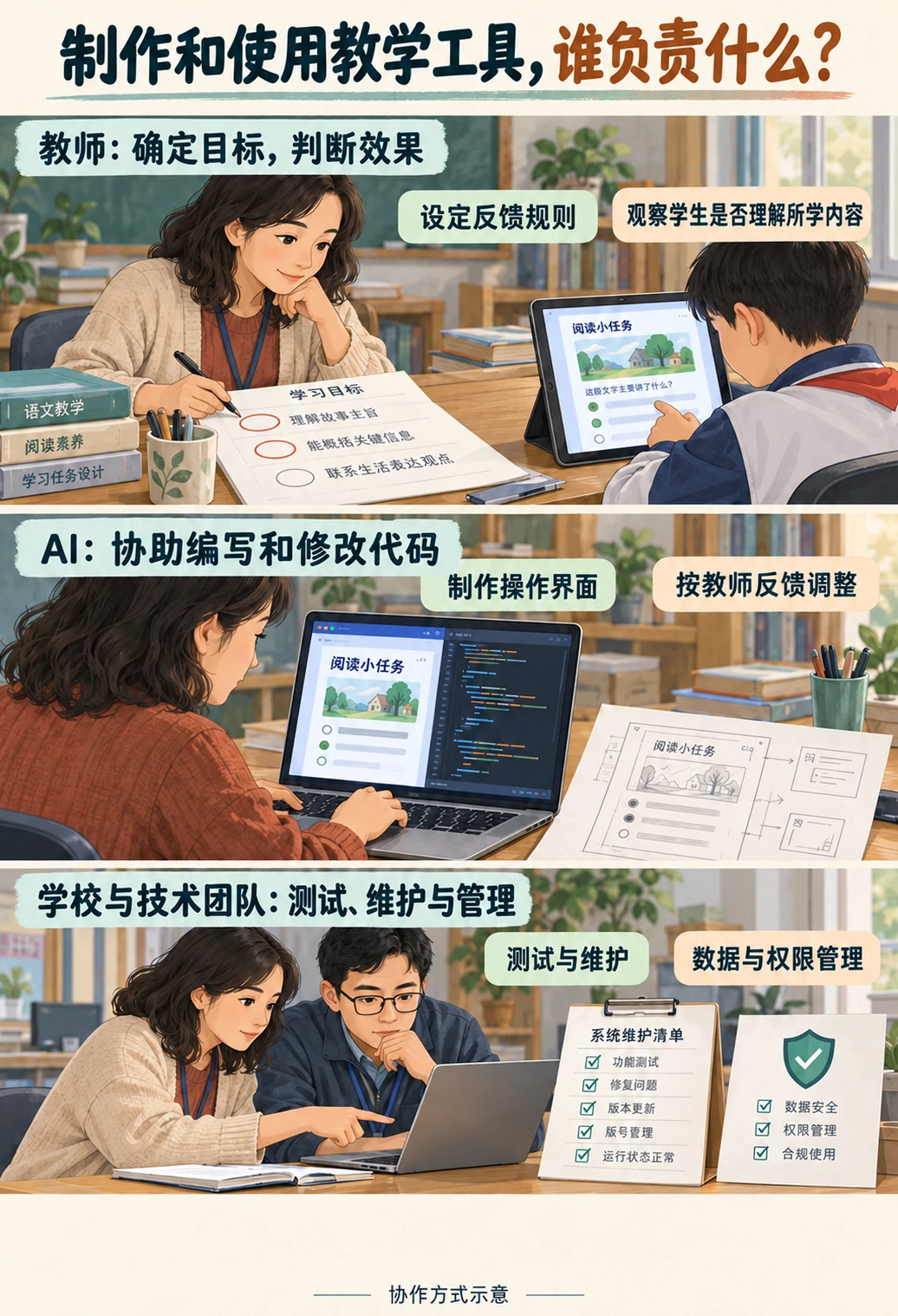
Teachers define goals and feedback rules and observe students’ understanding. AI helps write code and build interfaces. Schools and technical teams provide testing, maintenance, and data and access management.
Many practical issues remain. First, there is still a considerable distance between a working application prototype and a safe, stable, effective educational product.
AI can quickly generate an interactive exercise, but does its feedback serve the learning objectives? Does it genuinely help students understand? Might it provide incorrect information? If the application handles names, learning records, and classroom performance, how will privacy be protected? If another school adopts a teacher’s tool, who is responsible for testing, maintenance, and updates? AI’s ability to write code cannot resolve these questions on its own.
Teachers also differ in their technical experience, available time, and institutional support. Making AI application development a new job requirement could increase their workload and even widen existing differences in digital capability.
Educational AI therefore needs sustained support around it. Teachers need accessible ways to express requirements, generate prototypes, and check results, with professional security review, technical assistance, and long-term maintenance available when needed. Teachers should have the authority to decide how digital tools serve their teaching, with enough support that they do not have to bear all the costs of development and operation themselves.
There is another distinction to keep in view: helping teachers create tools does not automatically strengthen their professional autonomy. A system might decide instructional pacing, student grouping, feedback, and assessment by default, leaving teachers only to accept its recommendations. Strong generative and automation capabilities would not necessarily give teachers greater control. More important than whether teachers can create an app is whether they remain involved in, and retain authority over, key pedagogical judgments.
This brings us back to the Skills Jam report. It presents work produced during training, without systematically tracking whether the tools were still in use months later or establishing whether they improved student learning. [1] Moving from workshop prototypes to digital applications that serve teaching over time requires actual use, feedback, and validation. The available evidence does not establish that teachers are already developing educational software on a broad scale, much less that future education products will inevitably become teacher-created. But these projects reveal another possibility.
For decades, educational software has sought to digitize, standardize, and make teaching more intelligent. Along the way, teachers have often had to learn how a product works, understand its preset processes, and fit their activities into its features.
AI makes a different relationship possible. Teachers can start with a teaching problem, define the functionality they need, ask AI to help implement it, and keep revising it in response to results.
From Prompt to Skill to App, the distance between teaching expertise and digital technology is narrowing.
As this capability matures, the education technology industry may need to reconsider a question: if technology can adapt more readily to people’s ideas, why should teachers continually have to adapt to software designs?
Future education products will still need reliable models, teaching content, safety mechanisms, and evidence of learning effectiveness. Alongside these, another dimension may become increasingly important: how much scope does a product give teachers to exercise professional judgment and creativity?
Education is too complex to be fully covered by a fixed set of product features. That complexity is also where teachers’ professional value lies. Teachers have mainly chosen, learned, and used software designed by others. They now have an opportunity to participate more directly in defining, creating, and improving their own digital teaching tools.
Teachers do not necessarily need to become programmers. But the people who know their students best, understand their learning objectives, and can explain why an activity should be designed a certain way may finally face fewer barriers to turning their ideas into usable tools. This may be another important possibility AI brings to education: giving teachers more room to put their judgment into practice.
Sources
[1] OpenAI: From Curiosity to Classroom Outcomes, K–12 AI Skills Jam program report.
[2] OpenAI: Helping K–12 educators build practical AI skills, published July 8, 2026; updated October 15, 2026.
[3] Song et al.: A Guiding Framework for K–12 Teachers in Creating AI-powered Learning Technologies through Vibe Coding, arXiv preprint, submitted June 9, 2026.
AI contribution
The author wrote the original draft. AI assisted with revisions, source checking, and the design and generation of the cover and in-article illustrations. AI also translated the article into English and added English captions to the existing illustrations for this edition.