OpenMAIC: From Generating Courses to Running Them
OpenMAIC's evolution shows how an AI course can become an object that is generated, run, edited, and revisited.

I have followed OpenMAIC, a prominent project in AI-supported learning, for some time. When it released v1.0.0 last week, I decided it was a good moment to write about it.
This is not a product review. At this stage, I am less concerned with today’s output quality. Models and related technologies are changing quickly, and later iterations can address imperfections in what gets generated.
Instead, I want to follow OpenMAIC’s evolution from its first public release to v1.0.0 and examine how it designs an AI classroom.
How OpenMAIC designed the classroom, step by step
1. Start by defining a course as something that can run
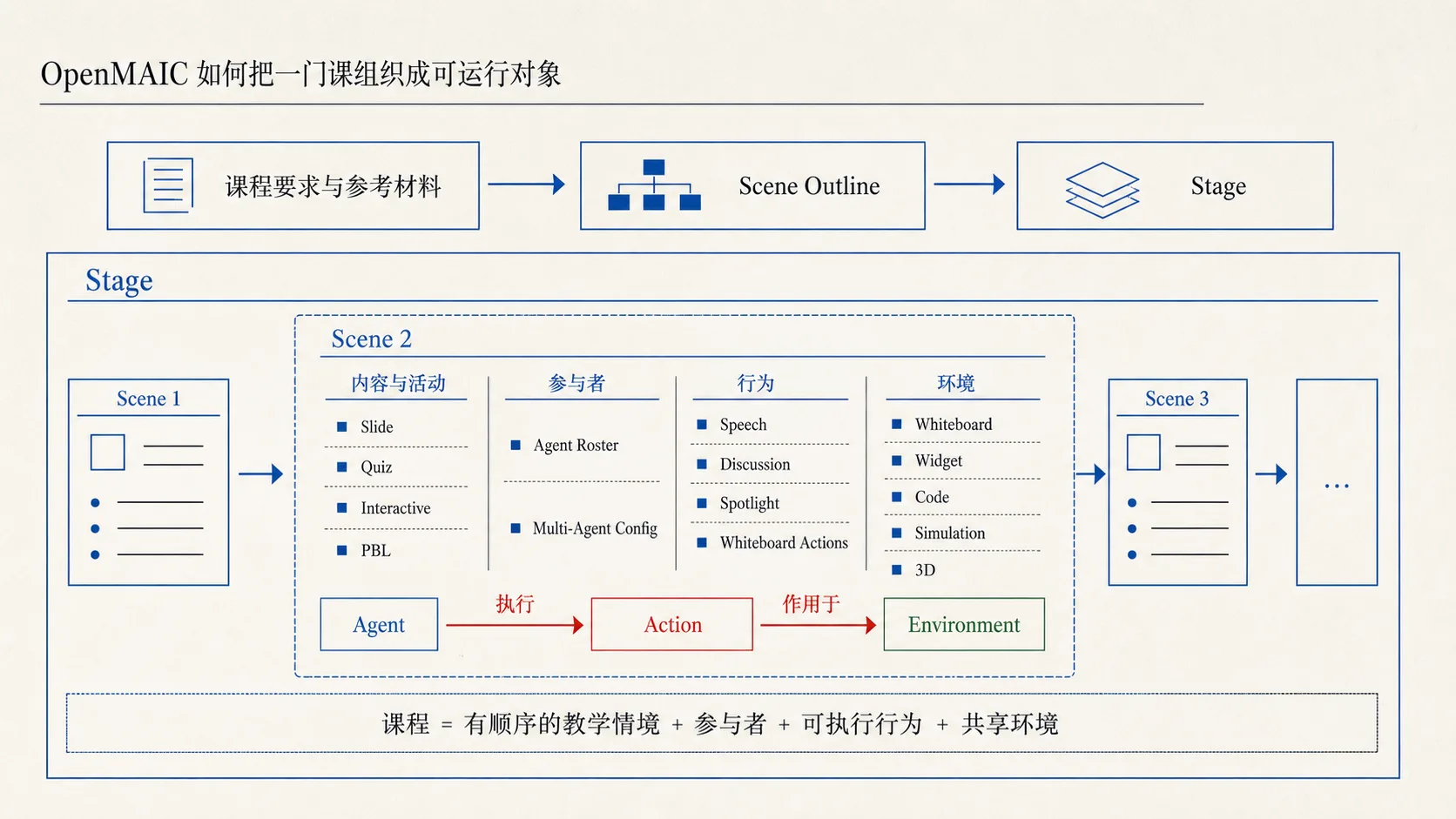
OpenMAIC first defines a course through a set of explicit objects.
At the top level, a course is represented in code as a Stage. A Stage contains multiple teaching Scenes. Each Scene contains SceneContent, teaching Actions, a shared environment such as a whiteboard and interactive components, and multiple agents participating in the classroom.
Scene content comes in four forms: explanatory slides, quizzes, interactive activities, and project-based learning. The content describes what an activity offers; actions define how it unfolds. Speaking, focusing attention, discussing, and editing the whiteboard are actions that can be generated, saved, and executed. Agents act upon the shared environment through them.
Course generation follows the same object structure. The system first plans a Scene Outline for the whole course from the request and materials, then generates content and actions for each scene. The outline records teaching goals, expected duration, quiz difficulty, interactive-activity design, and target skills for project-based learning. While generating a local scene, the model also sees its place in the whole course and what has been said before.
The two-stage generation process mirrors the course model: determine a connected sequence of teaching situations, then fill in the activities within each.
Once generated, a course can run through live scheduling (autonomous) or prerecorded replay (playback).
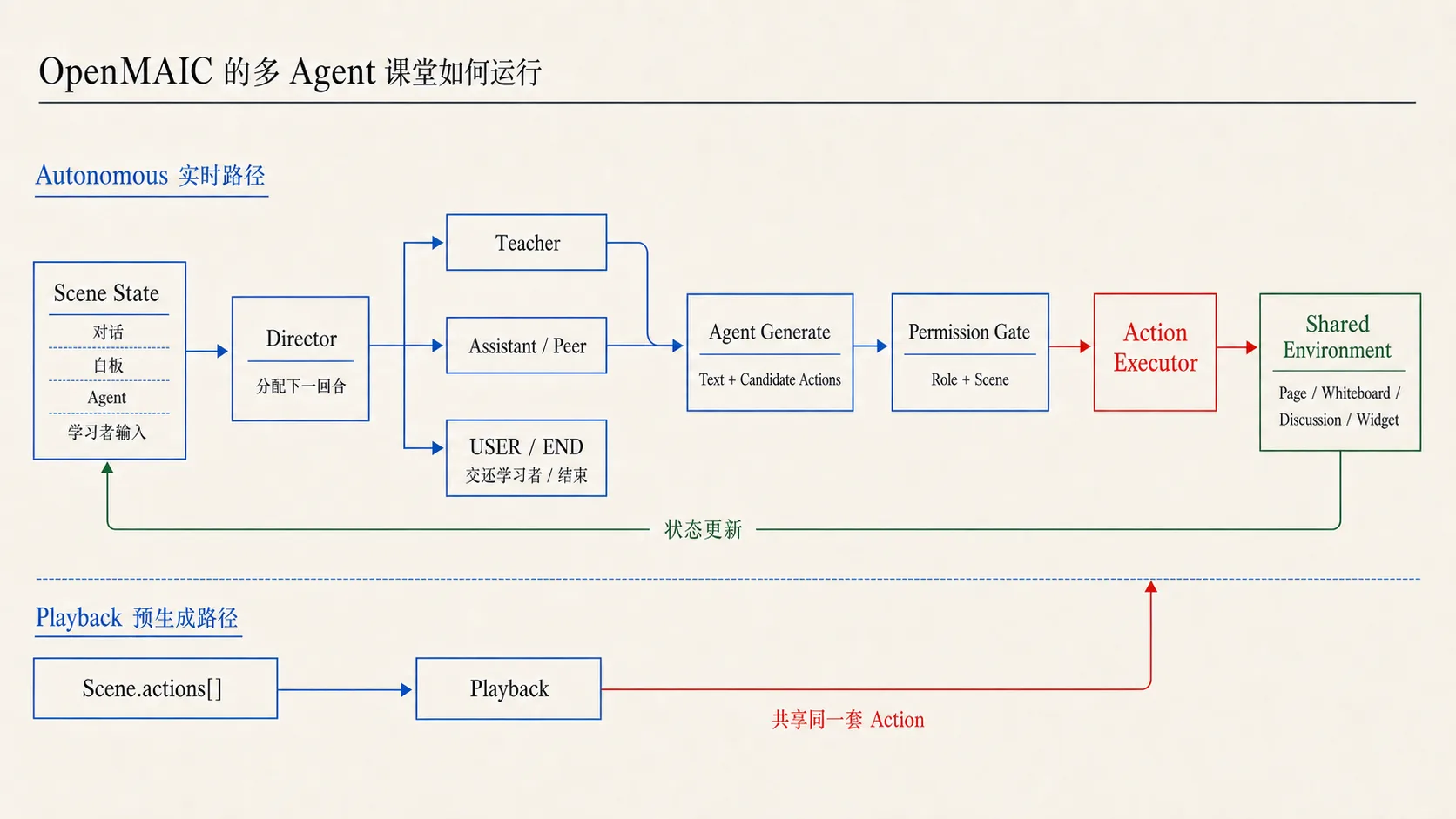
In live scheduling, a Director decides whether the next turn belongs to the teacher, teaching assistant, AI classmate, learner, or whether the discussion should end. The acting agent produces text and candidate teaching actions; the actions change the slide, whiteboard, or discussion state. If the Director chooses USER, the system waits for the learner.
Replay does not ask the Director to arrange turns in real time. It reads the saved sequence Scene.actions[] and executes each action in cursor order.
Both routes use the same action protocol. Whether an action comes from a live agent or a previously generated script, it changes slides, the whiteboard, discussion, or another classroom state through Action. Agent roles and ways of acting are also part of the course structure and runtime.
2. From slides to an operable environment
The initial actions already included speaking, focusing, using a laser pointer, playing video, discussing, and several whiteboard operations. Version 0.2.0 in April 2026 expanded the set from 15 to 20. An AI teacher could now draw and modify code and highlight, annotate, or reveal content in interactive components.
These actions let agents operate simulators, games, 3D objects, and code environments, changing their states while learners observe the feedback.
The interaction became richer, but the more important change was the relationship between the agent and the course object. The agent no longer merely explained a prepared slide. It could operate the environment supplied by the course.
3. Version 0.2.2: from generated output to editable document
Version 0.2.2 introduced an editable outline and the MAIC Editor. Before full generation, users could add, remove, change, and reorder scenes. After generation, they could revise text, images, and slide order. The StageMode field gained an edit option.
From v0.3.0, users could select, drag, and adjust objects directly on the canvas. Edit with AI could modify the same course document through validated structured patches. A course ceased to be a one-off generated result and became a document that could be saved and revised repeatedly.
OpenMAIC then extracted Stage, Scene, Action, and content structures into a separate course-description-language package, @openmaic/dsl. Generation, editing, rendering, importing, and storage began to share one document contract. Older documents could continue through validation and migration.
Images, audio, and other media in the course increasingly used stable asset IDs rather than being tied to a generator or temporary URL. If a course can be revised over time, its referenced assets need lifecycles of their own.
4. PBL v2: organize the project around the learner’s tasks
Version 0.3.0 rewrote project-based learning. In the earlier design, learners chose a development role and advanced a project through a task board. They asked a question-answering agent for help, and another agent judged whether tasks were complete.
PBL v2 moved the center of organization to learner tasks. An assessable project outcome was divided into milestones and microtasks. Milestones represented stages necessary for producing the outcome, not textbook chapters. Every microtask needed a standard by which its completion could be judged.
The number of AI teammates facing the learner was reduced, while responsibilities behind the scenes were separated further. A Planner designed tasks, an Instructor offered scaffolding, an Evaluator judged evidence, and a Simulator maintained the project setting. The learner still completed each microtask.
The Instructor could explain background, ask probing questions, and provide hints. It could not do the task for the learner or declare it complete without evidence of submission and understanding.
As the learner left process evidence—answers, submissions, mistakes, and requests for help—a Proficiency Engine used it to adjust the level of Instructor support. The project goal, task ownership, and completion criteria stayed the same.
5. Versions 0.3.1–0.3.2: separate the document from learning runtime
PBL v2 already recorded learner submissions, evaluations, and sessions, but initially kept that runtime data in the same object tree as the project design. Versions 0.3.1 and 0.3.2 gradually separated the course document from the learning runtime:
| Course document | Learning runtime |
|---|---|
| Stores Stage, Scene, Action, and course design | Stores sessions and records produced by learners |
| Can be generated, edited, imported, and migrated | Appends, completes, and archives events as they happen |
| Describes what the course is now | Preserves what a particular learner experienced |
In code, a DocumentStore persists the course document and a RuntimeStore persists records from learning. The latter includes PBL submissions and evaluations, classroom chat, quiz answers, and replay progress, appended in event order. A later edit to the course does not erase what already happened to a learner.
Document and learning experience now have two timelines: one moves with generation, editing, and revision; the other with the learner’s answers, actions, submissions, and completed tasks.
6. Version 1.0.0: from editable document to ongoing agent authoring
Version 1.0.0 added an Agent Workbench for course authoring. An authoring agent can read materials, call tools, and create or modify the course document directly.
The product now has two creation routes. Classic Mode generates a course in one pass when requirements are clear. Pro Workbench supports multiple rounds of agent work around the materials and course document.
The workbench did not invent a second course format. Its agent uses tools to change the same document developed in previous releases. The editor, asset system, and document storage still revolve around that object structure. The course model and editing capabilities established earlier became the basis for agent participation in authoring.
Materials are no longer inputs used only once during generation. The workbench keeps stable identifiers for them so an agent can repeatedly find and use them in an ongoing authoring session. The work itself is persisted; longer tasks can be cancelled or resumed rather than started again.
Classroom agents speak and act inside teaching scenes. The authoring agent reads materials, calls tools, and modifies the course document outside the classroom. OpenMAIC’s multi-agent design thus covers both making a course and running it.
The core design of OpenMAIC v1.0: a course an AI can operate
1. From generating to operating a course
By operating, I mean something different from generating new content from a request. AI can locate a specific object in a course, act on an existing structure, and leave the result of that action in the system.
OpenMAIC defines objects, actions, and state for a course. Classroom agents change the lesson underway through teaching actions; authoring agents change the course document that will be run later through tools. One acts on course runtime and the other on its document—different states of the same course.
The Agent Workbench is therefore more than a chat box beside the editor. The prior course structure, editing features, asset system, and storage boundary let an agent enter the course and keep making local changes.
2. What AI can do, and what the learner must still do
Once AI can operate a course, another question follows: which actions belong to agents and which remain with learners?
OpenMAIC can generate explanations, arrange activities, operate environments, give hints, and evaluate submissions. But a learner’s answers, attempts, errors, and task outcomes must still arise during the course. The system can change its help; it cannot fabricate evidence of learning in advance.
This is the more important layer of its multi-agent design. It is not just a cast of roles appearing in a classroom. It divides interfaces for action, permissions, and responsibility among different participants.
The code alone cannot show that these choices have improved learning outcomes. It does show that when AI enters a course, the design problem is not only generation quality. It is what AI can operate, how its actions leave results, and what the learner must do personally.
What might OpenMAIC 2.0 look like?
The following are my own projections from the design and implementation of v1.0.0, not announced plans for 2.0.
1. From a course document to a continuously running course system
The 0.3.x series established the course as a structured document:
Course = Stage + Scene + Action
Now a course is surrounded by documents, materials, media assets, authoring sessions, learner sessions, tool runs, runtime events, and revision history. These objects could eventually be managed as part of one more systematic course lifecycle. The definition might expand to:
Course = Document + Materials + Assets + Runtimes + Revisions + Publications
It would no longer be merely a Stage/Scene document waiting to be opened, but a running entity with identity, state, history, and a continuing lifecycle.
2. A common kernel behind two runtimes
Version 1.0.0 already contains two distinct runtimes:
- A Learner Runtime stores conversations, answers, project progress, and replay records.
- An Authoring Agent Runtime stores sessions, events, tool results, and cancellation and resumption state.
Their objects differ, but both must express sessions, events, participants, state, and lifecycle. OpenMAIC 2.0 might draw a common Runtime Kernel from that similarity:
RuntimeSession
RuntimeEvent
RuntimeActor
RuntimeJob
RuntimeCheckpoint
Authoring, learning, PBL, rendering, and agent sessions could become different runtime profiles over the same kernel. They could share basic management of sessions, events, and lifecycles while retaining their own data structures and operating rules.
3. From course-description language to intermediate representation
I noticed a clear path in OpenMAIC’s video export:
Course → VideoTimeline IR → Render Pipeline → MP4
It already hints at a course compiler. If extended, a 2.0 pipeline might look like:
Source Course → Validate → Normalize → Compile → Target Runtime
One course intermediate representation, or Course IR, could feed different outputs:
- An interactive classroom
- A static web page
- Video
- PPTX
- A SCORM or LMS course package
- A course delivered live by agents
The course would no longer be equivalent to one final piece of courseware. It would resemble a source file compiled into several forms for different runtime environments.
4. From saving to publishing
As courses acquire versions, runtime instances, and learning records, the main product action could change. Version 1.0 is closer to “edit and save a course.” Version 2.0 might support a fuller publication process:
Draft → Review → Validate → Publish → Run → Observe → Improve
Course versions, previews, rollbacks, publication history, environments, and compatibility checks could grow around that process.
Once a course has been published and run, the system needs to know which version was published and which version each learner session used. Later edits should not alter a course already underway; the learner’s experience should be reconstructable afterward.
5. From software packages to a headless platform
Version 1.0.0 already splits course description, generation, rendering, editing, and storage into separate packages. If that separation continues, OpenMAIC will no longer be defined solely by its Next.js web application.
Its architecture could instead be described as:
OpenMAIC = platform
Web application = reference implementation
Developers could install and combine packages directly:
npm install @openmaic/*
Then build their own learning-management systems, learning applications, training systems, or agent products on top.
6. From tools and Skills to an extension system
Version 1.0.0 has already given tools and Skills the ability to be saved, loaded, and managed beyond a single agent call. Continued development could bring them into a formal extension system.
I also noticed the OpenMAIC team working on dsh-openmaic, an attempt to connect OpenMAIC tools, Skills, and course capabilities to DeepSeek Harness through a plugin.
It is not yet an extension system inside OpenMAIC. It does, however, lend a concrete signal to this projection: tools, Skills, renderers, and course-generation capabilities are moving from internal application implementations toward capabilities that can be declared, loaded, and combined independently.
Following the plugin approach further, OpenMAIC 2.0 might have a formal extension model:
Extension
├── Skill
├── Tool
├── Provider
├── Renderer
├── Importer
└── Runtime Capability
A manifest could declare each extension’s name, version, permissions, tools, Skills, and runtime requirements.
Installing an extension might add more than a few prompt instructions. It could introduce new course objects, content sources, ways to act, or runtime environments. A plugin would become an installable course capability, not just a way to extend the code.
These are my personal interpretations of OpenMAIC v1.0.0 and possible directions beyond it.
In this reading, the center of OpenMAIC 2.0 might move from its web application toward a Course Runtime. It could become not only an AI classroom application but a platform for developing and running AI courses.
Translation: Codex prepared this English version from Biaoo’s published Chinese article. Biaoo examined the original project and developed the analysis and projections.